
Service Level Agreements
PDI Fuel Pricing Support SLA Addendum
for B2C and CSO Segments
Last Updated October 20, 2025
The terms set forth in this PDI Fuel Pricing Support SLA Addendum are applicable to PDI Fuel Pricing solutions provided by PDI pursuant to this Addendum.
Service Level Commitment
- Definitions. The terms below have the following meanings when used in this Section (Service Levels).
- “Available” means that the Products defined in this document are accessible from the public Internet.
- “Downtime Minutes” means the total number of minutes for which the Cloud Services are not Available during the applicable Measurement Period.
- “Measurement Period” means a calendar month.
- “Permitted Downtime” means any period of time during which the Cloud Services are not Available to Customer due to (a) a failure of the Internet or general Internet outage; (b) regularly-scheduled maintenance; (c) any acts or omissions of an internet service provider or other third-party engaged by or on behalf of Customer; or (d) Customer’s acts or omissions other than as directed by PDI or as expressly permitted under this Order Form. (e) “Total Minutes” means the total number of minutes in the applicable Measurement Period, minus any minutes of Permitted Downtime.
- Server Availability. Beginning on the Cloud Go-Live Date, PDI will measure the server Availability of the Cloud Services. PDI targets that the Cloud Services shall be Available no less than 99.5% of the time.
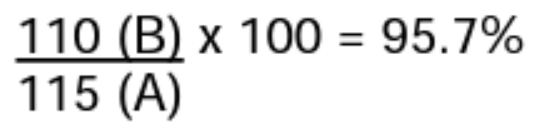
Monitoring of the service level targets will be calculated on a monthly basis by dividing the number of hours of actual time elapsed in providing total resolution time for Priority Level 1 and Priority Level 2 cases into the contractual target time for the cases based on the resolution time and multiplied by 100. Priority Levels 3 and level 4 cases are not part of the calculation.
Example: the total number of hours needed for resolution was 115 hours (A) and the total hours from the contractual targets was 110 hours (B), therefore the conformance level would be 95.7%.
Support Policy
Customers must consult with PDI before performing any upgrades on any third-party Software required to run the PDI Products. PDI shall not be required to provide support relating to problems or issues arising from third-party Software or under the following conditions:
- Modified or abnormal operating conditions:
- Customer’s use of PDI Products in a manner for which it was not designed
- Customer’s negligence, misuse or modification of the PDI Products or its configuration (including SQL)
- Customers must ensure PDI Product versions are kept updated as reasonably as possible
- Systems that do not meet the specifications or configurations, if any, specified by PDI
- Effects of external systems (network, data feeds, shared/virtual hardware, other products),
- Customer failure to keep current with backups, virus protection, operating system/database patches, or other IT best practices, or
- Accessing the Software or data except through the official APIs, supported FTPs, or any other means specifically agreed between PDI and Customer.
Basic Support Process
Access to PDI Support is included in your fee, unless stated otherwise in your license agreement.
Standard PDI Support is available Monday through Friday, 7:00 AM to 6:00 PM , except on published holidays. Billable callback support is available outside these hours at 150% of the standard services hourly fee or with the afterhours support plan.
Support requests received during business hours are logged and reviewed and routed to the best possible support consultant based on knowledge and availability. Support requests received after hours, on weekends, or during holidays other than those with an urgency of “P1 – (Critical)” are logged and dispatched on the following business day. Cases with a P1 urgency should be logged by calling the main support line or logged directly on PDI Connections. Emails are not monitored after hours.
PDI recommends that designated, experienced users log cases solely via PDI Connections. PDI requires that store-level issues be processed through an internal support group or helpdesk before a PDI support request is made. All users need to be authorized for case logging prior to making a support request. To add authorized users to your account, have an account administrator to log a case on PDI Connections.
Before Initiating a Support Request
Looking for an answer? Consult PDI’s website, PDI Connections, before initiating a support request. This site includes PDI Search, online knowledge base, and online documentation such as user’s guides, reference guides, training material, and release notes. Using these resources can often resolve common questions and issues without a support request.
Remote Connection Options
PDI support consultants may need to access your system remotely while resolving a support request. The consultant will obtain your approval before connecting to the system. Multiple remote connection options are supported, but additional charges may be incurred if your company does not support remote connection options.
How to Make a PDI Support Request
Whilst email is available, PDI Connections is the easiest and fastest way to raise Support requests: https://profdata.my.site.com/pdiconnections
Upon raising a case the Customer assigns a case priority, based on their assessment of the impact and urgency of the issue. Support analysts use case priorities to help determine the order of precedence for managing their workload. The case owner will discuss the case priority with the Customer to ensure the impact and urgency of the issue are understood. The case priority may change during the lifecycle of the case and typically upon the initial triage of the case.
Customer Obligations
- Customers must consult with PDI before performing any upgrades on any third-party software required to run the PDI Products. Customers must ensure PDI Product versions are kept updated as reasonably possible.
- PDI shall not be required to provide Support Services relating to problems or issues arising from third-party software or under and of the following conditions: (1) modified or abnormal operating conditions; (2) Customer’s use of PDI Products in a manner for which it was not designed; (3) Customer’s negligence, misuse or modification of the PDI Products or its configuration (including SQL); (4) Systems that do not meet the specifications or configurations, if any, specified by PDI; (5) effects of external systems (network, data feeds, shared/virtual hardware, other products), (6) Customer failure to keep current with backups, virus protection, operating system/database patches, or other IT best practices; (7) accessing the Software or data except through the official APIs, supported FTPs, or any other means specifically agreed between PDI.
In Region Support Hours
PDI’s in region support hours based on priority level are as shown below, based on Customer’s region. Helpdesk Support requests received during business hours are logged, reviewed, and assigned to the best possible support analyst, based on knowledge and availability.
| Priority | EMEA Region | APAC Region | Americas Region |
| P1 Support Hours | 24 hours per day 365 days per year (excluding 25th December) | 24 hours per day 365 days per year (excluding 25th December) | 24 hours per day 365 days per year (excluding 25th December) |
| P2, P3, P4 Support Hours | 8:00am – 6:00pm GMT; Monday to Friday (excluding public holidays) | 8:00am – 5:30pm ICT; Monday to Friday (excluding public holidays) | 7:00am – 6:00pm CT; Monday to Friday (excluding public holidays) |
Case Priorities and Definitions
All cases are assigned a case priority, based on the impact and urgency of the issue. Support professionals use case priorities to help determine the order of precedence for managing their workload. The case owner will discuss the case priority with the customer to ensure the impact and urgency of the issue are understood. The case priority may change during the lifecycle of the case.
Below are the definitions of case priorities in order from the highest to lowest priority.
| Priority | Priority Definition | Severity Definition |
| P1 – (Critical) | Major business-critical production issues requiring immediate attention. These issues represent a complete degradation of product functionality with no available workaround. Critically essential product functionality is inoperable with no available workaround, potentially resulting in financial loss. Potential for significant data loss or major security vulnerabilities requiring immediate resolution. Communication failures between critical components of the solution, impacting multiple users or solution modules. Urgency: Immediate 24/7/365 attention is required to restore production. Note: If the root cause of a P1 case is determined not to be attributable to PDI, the case priority may be downgraded to P3. | P1 – Severity 1 Complete system outage or major service disruption impacting all users or sites. P1 – Severity 2 Severe degradation of core functionality impacting a large number of users. A temporary workaround may exist but is not sustainable or reliable. Impact can be lessened by restarting the server or related applications. |
| P2 – (Urgent) | Substantial production issue on business operations with a workaround not available for single functionalities. Incidents causing the application not to operate in accordance with the specification, but still usable with difficulty including some disruption to business activity. A single functionality is impaired with no workaround available. Isolated parts of the system not functional. Performance degradation resulting in system slowness although system/modules remain operable. Urgency: Needs attention and resolution as soon as possible. Cases are worked during normal business hours. | P2 – Severity 1 Key functionality is broken for a subset of users or sites. A workaround does not exist for single functionalities or workaround exists, but is complex or unreliable and issue significantly impacts productivity. P2 – Severity 2 Moderate impact on non-core features or performance with workaround available and generally effective. |
| General product functionality issues with known workarounds available. Issues present in production environment which do not halt operations. Urgency: Cases are worked during normal business hours. | P3 – Severity 1 Usability issues or impairments in non-core functionality that could escalate if not addressed. Includes post-deployment issues or bugs that have minor impact. P3 – Severity 2 Minimal business impact. | |
| P4 – (Low) | Cosmetic defects, problem management issues or generic inquiries in the Production or Test/Stage environments that do not affect business operations. Urgency: Cases are worked during normal business hours with no time-sensitive impact. | Severity is not applicable for P4 cases, as they involve cosmetic, informational, or non-functional issues with no measurable business impact. |
Initial Response Rates
The case owner will attempt to resolve the issue during the initial customer contact. If the case owner successfully resolves the case, information regarding the issue will be documented in the case and the case status will be set to ‘Closed’. See the “Case Statuses” section of this guide for more information on case statuses. Initial response times are determined by the assigned case priority, as outlined in the table below, together with the corresponding First Response SLA percentage targets.
| P1 – (Critical) | P2 – (Urgent) | P3 – (Important) | P4 – (Low) |
| Within 1 hour | Within 2 Business Hours | Within 3 Business Hours | Within 6 Business Hours |
Case Resolution Rates
For cases, which require ongoing investigation, the case owner will discuss the next technical actions with the customer, agree on the case priority and next communication. As troubleshooting and case work progress, the case owner will maintain communication with the customer at a frequency mutually agreed upon.
The Case Resolution Rate is determined based on the case priority. If no code change or escalation to engineering is required, the target case resolution times and associated SLA performance targets are as follows:
| P1 – (Critical) | P2 – (Urgent) | P3 – (Important) | P4 – (Low) |
| Within 6 Hours | Within 3 Business Days | Within 10 Business Days | Best Effort |
Note: If a code change is required and defect CR created to fix the issue then the support case will be closed.
Critical Incident Reporting and Problem Management
For critical incidents, a Reason for Disruption (RFD) report may be provided, containing a remediation plan, delivered by the assigned Account Manager or Customer Success Manager within three business days of resolution, unless otherwise specified in the governing agreement. Permanent resolutions or documented workarounds will be delivered within mutually agreed timelines.
PDI has established a structured Problem Management process designed to identify, analyze, and eliminate the root causes of recurring incidents. PDI Support will proactively monitor and log recurring issues under Problem Management cases identified through standard support cases, ensuring these are analyzed and addressed to prevent future occurrences.
Case Statuses
Each technical support case is assigned a status to indicate its current stage and any pending actions. The status is maintained in the Case Management System and updated as the case progresses toward resolution. The table below outlines the case statuses, their definitions, and the corresponding SLA clock behavior. If a customer adds a comment or update to a case in a paused status (e.g., ‘Waiting on Customer’ or ‘In Customer Review’), the status will automatically change to ‘Open’ and the SLA clock will resume.
| Case Status Definition | ||
| Open | The case has been assigned to a PDI case owner in the Support Team and is currently under investigation. | Running |
| Waiting on Customer | The customer has actions or tasks to complete before support investigation can continue. | Paused |
| In Customer Review | PDI’s work is complete, and the case is being held open as a courtesy to allow the customer to confirm resolution. | Paused |
| Escalated | The issue requires product code changes or code-level troubleshooting and is under investigation by Engineering resources. | Running |
| On Hold | The customer is conducting further due diligence on the issue and has requested that work on the case be temporarily suspended. Note: Cases placed in ‘On Hold’ status at the customer’s request will remain in this status for a maximum of 10 business days unless otherwise agreed in writing. After this period, PDI will notify the customer and may close the case if no further action is taken. | Paused |
| Awaiting Deployment | The fix has been completed and is ready for implementation. Support has completed all actions within its control and the remaining work is pending scheduling or execution by the responsible team. | Paused |
Case Closure and Follow Up Definitions
Cases will be closed promptly once the Support Analyst has confirmed that the issue is resolved, or if no further action is required, or the customer has become unresponsive as PDI is committed to ensuring that cases do not remain idle. If the Support Analyst does not receive a response from the customer, they will make at least two follow-up attempts before closing the case. The follow-up timeframes, based on case priority, are outlined below.
| P2 – (Urgent) | P3 – (Important) | P4 – (Low) | |
| Every 30 mins. until case closure | First Follow Up Response sent after 1 business day after delivering the proposed solution to confirm resolution and gather feedback. Second Follow Up Response sent 1 business day after the first follow up if no response is received. This message will clearly state that the case will be closed if no reply is received within 1 additional business day. | First Follow Up Response sent after 1 business day after delivering the proposed solution to confirm resolution and gather feedback. Second Follow Up Response sent 2 business days after the first follow up if no response is received. This message will clearly state that the case will be closed if no reply is received within 1 additional business day. | First Follow Up Response sent after 3 business days after delivering the proposed solution to confirm resolution and gather feedback. Second Follow Up Response sent 3 business days after the first follow up if no response is received. This message will clearly state that the case will be closed if no reply is received within 1 additional business day. |