
Why can the same AI model answer a question in one application and complete an entire job in another?
Open a chatbot and ask it to fix a typo on your website, and it may explain what to change. Give the same task to an AI coding tool, and it can open the file, make the edit, check that the page still loads, and present the change for review.
Both tools may use the same underlying AI model. The difference is the software around that model: the Agent Harness.
An Agent harness gives the model the context, tools, permissions, and safeguards it needs to move beyond conversation and take action. In this post, we’ll explain how agent harnesses work, the different forms they take, and what organizations should consider before putting them to work.
The model thinks. The harness lets it act.
On its own, an AI model reads input and generates output. It cannot open a file, connect to a database, search the web, or remember what happened after a session ends unless the surrounding application gives it those capabilities.
The harness provides that operating environment. It determines:
- What context the model receives
- Which tools and systems it can access
- How it plans and works through a task
- What information it retains as the work progresses
- Which actions require human approval
- How results are checked and activity is logged
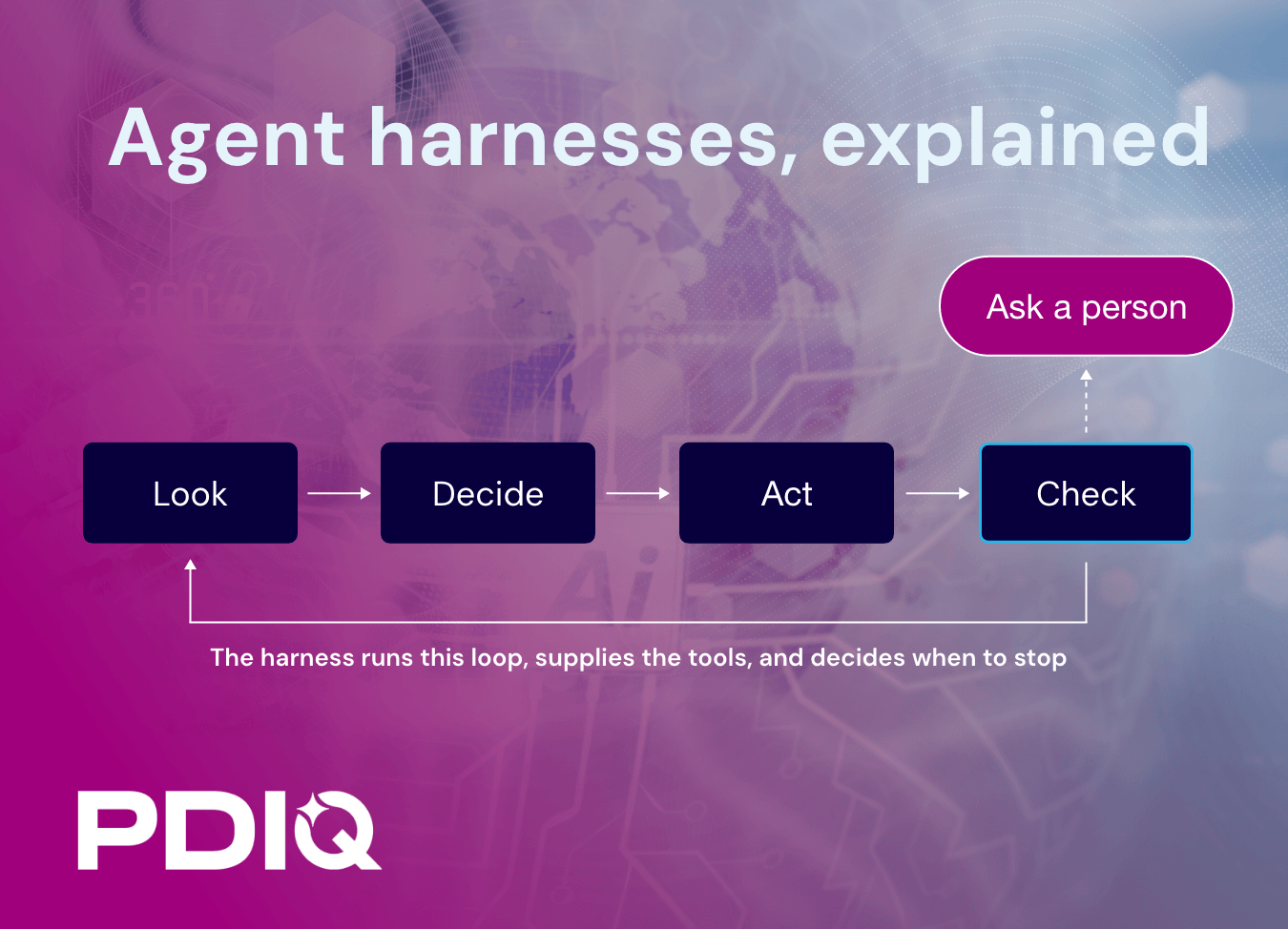
In practice, the harness runs a loop: look at the current state, decide what to do, take an action, check the result, and either continue or ask a person for input.
This is why people often describe an agent as:
Agent = model + harness
The model matters, but the harness can change the result substantially. Harvey, a legal AI company, reported that the average task-success rate across 12 internal legal tasks increased from 40.8% to 87.7% after it reworked the harness while keeping the model the same. The example is specific to Harvey’s evaluation, but it illustrates a broader point: how a model is equipped, guided, and checked can matter as much as the model itself.
Five types of agent harnesses
The term “agent harness” covers several kinds of products. They share the same basic idea, but they operate in different environments and carry different risks.
Coding harnesses
Coding harnesses work inside a software project. Examples include Claude Code, OpenAI Codex, Cursor, OpenCode, and Pi. Give one a bug to fix and it can locate the relevant file, make a change, run tests, address failures, and present the result to an engineer for review.
Coding was an early fit for agent harnesses because software often comes with automated tests. Those tests give the agent a way to check whether its work behaves as expected.
Desktop assistants
Desktop assistants work across files and applications on a computer. OpenClaw is one open-source example, and AI providers are adding similar capabilities to their own applications.
For example, a desktop assistant could open a folder containing supplier invoices, extract the relevant information, and create a spreadsheet showing totals by vendor. Because these tools may use a person’s files, applications, and credentials, their permissions need particular care.
Browser agents
Browser agents use websites by clicking, typing, navigating, and completing forms. Examples include Claude in Chrome, ChatGPT’s built-in browser, and Perplexity’s Comet.
A browser agent could check delivery availability across several supplier portals and prepare a reorder form, then stop before submission so a person can review it. That last step matters: the harness should distinguish between preparing an action and committing it.
Research agents
Deep research tools in ChatGPT, Gemini, and Claude can run multiple searches, review the results, and produce a report with sources. Ask one to compare EV charging incentives in the states where you operate, for example, and it can return a synthesized, cited summary rather than a list of links.
Here, the harness manages the search process, keeps track of findings, and organizes the final response. The person reviewing the work still needs to assess the sources and conclusions.
Build-your-own frameworks
Some harnesses are designed as building blocks for teams creating their own agents. Anthropic’s Claude Agent SDK, OpenAI’s Agents SDK, Google’s Agent Development Kit, and LangChain’s Deep Agents provide components for tool access, memory, execution loops, and approval steps.
Workflow platforms such as Zapier, n8n, and Activepieces also allow teams to add an agent as one step in a broader automation. For example, an agent might read an incoming email and determine which queue should receive it, while the workflow handles the predictable steps before and after that decision.
| Type | Examples | ||
| Coding | A software project | Automated tests, then an engineer | Claude Code, Codex, Cursor, OpenCode, Pi |
| Desktop | Files and applications on a computer | The user | OpenClaw and AI desktop applications |
| Browser | Websites and web applications | The user, especially before submission | Claude in Chrome, ChatGPT’s built-in browser, Comet |
| Research | The open web and connected sources | The user, by reviewing sources and conclusions | Deep research in ChatGPT, Gemini, and Claude |
| Build-your-own | Systems selected by the development team | Controls, tests, and approval steps defined by the team | Agent SDKs, Deep Agents, Zapier, n8n, Activepieces |
What a good harness gets right
The environment changes, but effective harnesses tend to follow the same principles:
- Provide focused context. Give the model the information it needs for the current task without loading unrelated material.
- Limit tool access. Each agent should have only the tools and permissions its job requires. An agent that categorizes support requests does not need access to payroll.
- Check the result. Use tests, defined criteria, or human review instead of relying on the agent’s own assessment.
- Require approval for consequential actions. Sending, paying, deleting, and publishing should have clear approval gates when the action is difficult to reverse.
- Keep an activity record. Logs make it possible to understand what happened when a result looks wrong.
- Set operating limits. Time and step limits, along with usage caps, prevent an agent from running indefinitely when it cannot complete a task.
These controls are not separate from the agent. They are part of the harness and part of what makes the system suitable for real work.
Set the right level of autonomy
An agent should be treated like a capable new employee: it still needs a defined role, limited access, and appropriate review.
A practical way to introduce an agent is to increase its autonomy in stages:
- Suggest only. The agent recommends an action, and a person completes the work.
- Act with approval. The agent prepares the action, but a person must approve it before it proceeds.
- Act independently on narrow tasks. The agent handles small, well-understood, reversible actions on its own.
Move to the next stage only after the agent has performed reliably at the one before it.
Scope matters, too. An agent that reconciles invoices is easier to evaluate, trust, and improve than one expected to “handle the back office.” Policies also need to be explicit. An agent cannot reliably follow a rule that exists only in someone’s head.
Desktop and browser agents require extra care because they may act through a user’s accounts. A webpage, document, or email can contain hidden or misleading instructions that an inadequately protected agent may follow. This is known as prompt injection.
Security researcher Simon Willison describes a particularly risky combination: an agent has access to private data, can read untrusted content, and can communicate externally. When all three are present, a malicious instruction may be able to cause data to leave the system. In that situation, permissions should be tightly limited and a person should remain in the loop.
The boundary between model and harness will also continue to change. As models improve, some work that requires extensive scaffolding today may become a built-in capability tomorrow. The need for clear permissions, checks, and accountability will remain.
How we use agent harnesses at PDI
Our engineering teams use coding harnesses to help write, test, and review code. Engineers still decide what ships.
When we build AI features, we start with established agent frameworks instead of creating an entire harness from scratch. That allows our teams to focus on the parts that matter most for our industry: the data, operating controls, permissions, and checks that determine whether an agent can operate safely and usefully.
Questions to ask about any AI agent
The next time a vendor, colleague, or news story describes an “AI agent,” the model is only part of the picture. Ask:
- What information and systems can it access?
- What can it do without asking?
- Who or what checks its work?
- If it makes a mistake, can we see what happened and reverse the action?
The answers describe the harness. They also tell you far more about whether the agent is ready for real work.